
PK915 Game Download APK Pakistan – Complete 2026 Guide

Description
PK915 is a mobile gaming app built for Pakistani players. It includes card games, crash games, slots, and quick lottery-style rounds in one Android app that uses Pakistani Rupees (PKR). The app is not available on the Google Play Store, so users install it through an APK file.
This guide covers the PK915 download process, account registration, wallet features, and the main games available inside the app. It also discusses potential problems, payment methods, and important safety considerations.
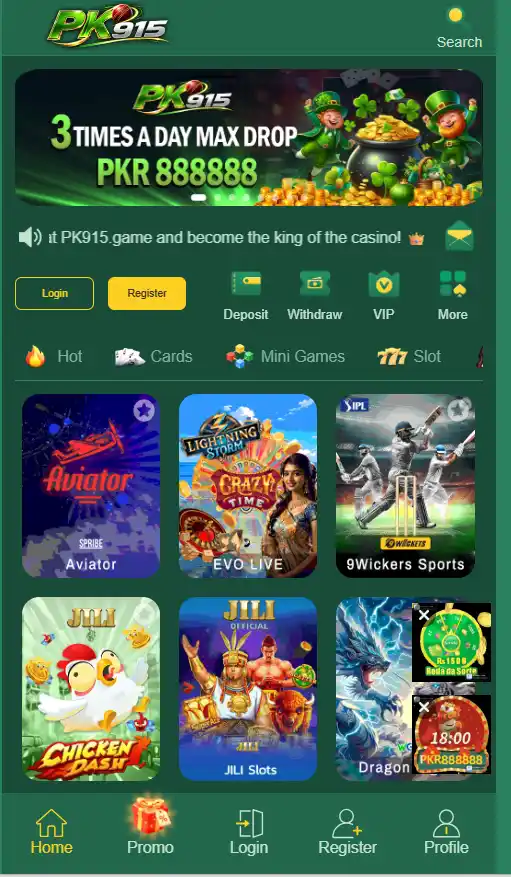
Here are the most important things to know before getting started:
- What it is: A casino-style gaming app that uses PKR, not a skill-based game or a reliable income source.
- How to download it: PK915 is distributed through an APK file. Check the file carefully before installing it.
- Payment methods: JazzCash and Easypaisa are the usual options shown inside the wallet.
- Important consideration: Players can lose money over time. Only consider spending money you can afford to lose.
PK915 APK Details at a Glance
The version number and file size may change with app updates. Check the information on the APK file you actually download rather than relying on outdated details published by other websites.
| Detail | PK915 Game |
|---|---|
| App name | PK915 Game |
| Type | Casino-style games in PKR |
| Latest version | [Your tested version] |
| File size | [Your tested size] MB |
| Android needed | [Check your installation; usually Android 5.0+] |
| Currency | Pakistani Rupee (PKR) |
| Payment methods | JazzCash, Easypaisa (as shown in the wallet) |
| Google Play Store | Not listed |
| Last checked | [Date you tested] |
How to Download and Install PK915 on Android
Installing PK915 Game involves downloading its APK file and allowing Android to install applications from your selected source.
The following steps explain the installation process in a simple way.
Step 1: Download the PK915 APK
Visit the download page and tap the APK download button. Avoid downloading installation files from random WhatsApp or Telegram groups because modified APK files may put your personal information and wallet details at risk.
Step 2: Check the Downloaded File
Open your phone’s Downloads folder and locate the PK915 Game file. Confirm that the filename ends in .apk and compare its size with the information listed in the details table.
If the file size is significantly different, verify the download source before continuing.
Step 3: Allow APK Installation
Android may display a security warning when you try to install the APK.
To allow installation:
- Open your phone’s Settings.
- Select Apps or Special App Access.
- Find Install Unknown Apps.
- Select the browser or file manager you used.
- Allow installation from that source only.
The exact menu names may vary depending on your Android version.
Step 4: Review App Permissions
Before installing, check the permissions requested by the application. Be cautious if a gaming app requests unnecessary access to your contacts, SMS messages, or call logs.
Cancel the installation if the requested permissions seem inappropriate.
Step 5: Install and Open Game
Tap the downloaded APK file and select Install. Wait for the installation process to finish, then open the platform from your phone’s home screen.
Step 6: Turn Off Unknown App Installation
After installation, return to your Android settings and disable the Install Unknown Apps permission for the browser or file manager. Keep Google Play Protect enabled.
How to Fix the App Not Installed Error
If Android displays an “App not installed” message, consider these troubleshooting steps:
- Remove an older PK915 installation if you no longer need it.
- Check whether your phone has enough available storage.
- Make sure the APK file downloaded completely.
- Verify that the APK is compatible with your Android version.
- Download the installation file again from a source you trust.
These checks may help resolve common installation problems.
Creating a PK915 Game Account and Logging In
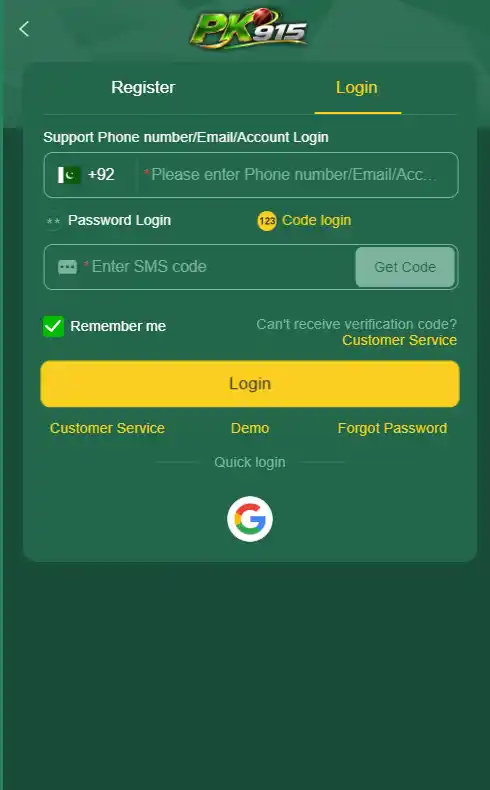
After installing, users can create an account using a Pakistani mobile number.
The registration process may support Jazz, Zong, Telenor, and Ufone numbers, depending on the app’s current requirements.
How to Register on PK915
Follow these steps to create an account:
- Open the PK915 application.
- Tap the Register option.
- Enter your Pakistani mobile number. If the country code +92 is already displayed, follow the number format requested by the app.
- Create a strong password of at least eight characters that you do not use for other accounts.
- Enter the OTP received through SMS.
- If the OTP does not arrive, check your mobile signal and try the resend option.
- Enter an invitation code only if you have one. It may be optional.
Once the required information is submitted and verified, your registration should be complete.
How to Log In to PK915 Game
If you already have an account, open the application and select Login.
Enter your registered mobile number and password, then follow any additional verification instructions displayed on the screen.
How to Reset Your PK915 Password
If you forget your password, look for the Forgot Password option on the login screen.
Follow the displayed instructions to reset your password through the available verification method.
Never share your OTP with anyone claiming to be a support representative. Keep your login information private.
Games You’ll Find Inside PK915
It includes several casino-style game categories in one application. The available games may vary depending on the app version and current lobby.
Aviator (Crash Game)
Aviator is a crash-style game in which a plane moves upward while a multiplier increases. Players must cash out before the plane disappears.
Rounds can last approximately 10–30 seconds. Because the rounds are fast, losses can accumulate quickly.
Teen Patti
Teen Patti is a three-card game based on traditional South Asian card rules. Players receive three cards, and the winner is determined by the hand rankings.
A typical round may take around one or two minutes. Familiar rules do not remove the financial risk involved.
Dragon Tiger
Dragon Tiger is a card game in which one card is dealt to Dragon and another to Tiger.
The higher card determines the winner. Rounds are usually very short, and outcomes are primarily based on chance.
Slot Games
Slot games use spinning reels and symbols. Players select their stake and spin the reels to see whether matching symbols appear across the paylines.
Each round takes only a few seconds, and results depend on the game’s random number generation.
Fishing Games
Fishing games involve shooting at different fish that may have different multipliers.
Each shot can cost part of the player’s balance, so it is important to understand the cost before playing.
Color / Wingo Games
Color or Wingo-style games ask players to select a color or number before a countdown ends.
Rounds may take approximately one to five minutes. Although these games are sometimes advertised as earning opportunities, they involve betting and financial risk.
Adding and Withdrawing Money with JazzCash or Easypaisa
The wallet is where users can access deposit and withdrawal options. JazzCash and Easypaisa are the payment methods described in the app’s wallet.
How to Deposit Money into PK915
If you decide to use the wallet, the deposit process may involve these steps:
- Open PK915 and go to Wallet or Deposit.
- Select JazzCash or Easypaisa if available.
- Enter the amount you want to deposit.
- Review the minimum deposit requirement displayed on the screen.
- Follow the payment instructions.
- Approve the transaction through the relevant wallet application or MPIN prompt.
- Keep the transaction ID or payment receipt for your records.
How to Withdraw Money from PK915
The withdrawal process may involve the following steps:
- Open the Wallet section.
- Select Withdraw.
- Link the required payment account if prompted.
- Check whether the account details match your registered information.
- Enter the withdrawal amount.
- Review any applicable wagering or turnover requirements.
- Submit the withdrawal request.
- Check the transaction status inside the app.
What to Do If Your Withdrawal Is Pending
If a withdrawal remains pending, check the processing time displayed by the application.
If it stays pending for more than a day, consider contacting the app’s support service with your transaction ID and payment screenshot.
Do not deposit additional money to unlock or release a pending withdrawal. Requests for extra payments to release funds can be a warning sign of fraud.
Bonuses and Invite Rewards
PK915 may advertise different promotional offers, including sign-up bonuses, daily check-in rewards, and invitation commissions.
- Turnover requirements: The amount you must wager before withdrawing eligible bonus winnings.
- Expiry date: How long the promotional offer remains valid.
- Withdrawal limits: Any restrictions on withdrawing money earned through a bonus.
- Eligibility: Whether the offer applies to your account.
A bonus with high wagering requirements may provide less practical value than it initially appears to offer. Never deposit money simply because a promotional message encourages you to claim a reward.
My Hands-On Experience with PK915
The menus use simple English and large buttons, which may make navigation easier for first-time users.
However, there were also some drawbacks:
- Deposit pop-ups and bonus banners appeared frequently on the home screen.
- Some bonus conditions were difficult to locate.
- In-app support responses were slower during the evening.
- The app’s promotional messages placed considerable attention on deposits and rewards.
Testing note: Before publishing this section as a first-hand review, replace or confirm these details using your own actual testing. Include the phone model, Android version, installation time, and any verified transaction experience. Do not present unverified testing details as personal experience.
PK915 Strengths and Weak Points
| Strengths | Weak Points |
|---|---|
| Small and lightweight application | Not listed on the Google Play Store |
| Supports local wallet options, as displayed | Requires APK installation |
| Offers different game categories | Bonus terms may be difficult to find |
| Mobile number-based registration | Frequent deposit promotions |
| Uses Pakistani Rupees | Withdrawals may be delayed |
| Simple navigation | Real risk of losing money |
Overall, the app combines several game categories in one place, but its APK distribution and real-money betting features require careful consideration.
Is PK915 Safe and Legal in Pakistan?
Installing an application successfully does not establish that its operator is trustworthy or that its payment system is secure. Because it is distributed outside the Google Play Store, users should be particularly careful about the APK source and the information they share.
Real-money gambling and betting are also subject to legal restrictions in Pakistan. Users should independently verify the applicable laws and regulations before accessing such services.
Safety Tips Before Using PK915
Consider the following precautions:
- Never share your OTP, MPIN, or wallet PIN with another person.
- Use a separate password for PK915.
- Avoid modified APK files and unofficial prediction tools.
- Do not trust groups promising guaranteed wins.
- Review app permissions before installation.
- Avoid spending borrowed money or money needed for essential expenses.
- Set a strict spending limit and stop when you reach it.
- Take a break if gaming starts affecting your work, studies, sleep, or family life.
PK915 FAQs
Is PK915 a Real Earning App?
No. It is a casino-style betting application, not a reliable earning platform. Some players may win individual rounds, but there is no guaranteed income, and users can lose money.
Why Isn’t PK915 on the Google Play Store?
It is not listed on the Google Play Store. The app is distributed through an APK file instead. Always verify the source before downloading and installing it.
Can I Play on iPhone?
The testing information available for this article did not identify an official iPhone App Store version. If the operator offers a browser version, check its authenticity before using it.
What Should I Do If My Withdrawal Is Pending?
Check the processing time displayed in the app. If the withdrawal remains pending beyond the stated period, contact the available support service with your transaction ID and payment screenshot.
Can I Delete My Account?
Check whether the application provides an account closure option. You can also contact its support service to ask about the account deletion process.
Final Verdict
PK915 brings several casino-style games, including Aviator, Teen Patti, Dragon Tiger, and slots, into one mobile application that uses Pakistani Rupees. Its APK installation process and mobile-friendly interface may make it accessible to Android users.
However, there are important drawbacks. The app is not listed on the Google Play Store, real-money betting involves financial risk, and payment or withdrawal conditions may change.
It should not be considered a way to earn a steady income. Anyone researching the app should carefully review its download source, permissions, payment conditions, and applicable legal restrictions before making a decision.
You can also read our complete T7777 Game safety guide to learn about real-money gaming risks and precautions.

MD Mushtaq writes for apkbetget.com.pk, covering the mobile gaming and real-money earning apps popular with Pakistani users. Each article looks at the practical side of these platforms how to get set up, how deposits and withdrawals actually function, what bonuses mean in real terms, and what to check before trusting an app written in plain, everyday language for anyone giving these platforms a first try.